Bulk Segment Management
Bulk Segment Management is used to create or update dynamic segments in bulk. You can bulk edit segments directly within the segment itself in DailyStory, or use a CSV file to create and update segments at scale. Bulk editing is an advanced feature and requires knowledge of DailyStory's dynamic segment syntax. Uses include:
- Updating segment names to follow a consistent pattern
- Updating search criteria across many segments at once
- Activating, pausing, or deleting segments in bulk
- Creating many similar segments
- Removing unused segments
Bulk segment management is a feature only available to enterprise DailyStory customers.
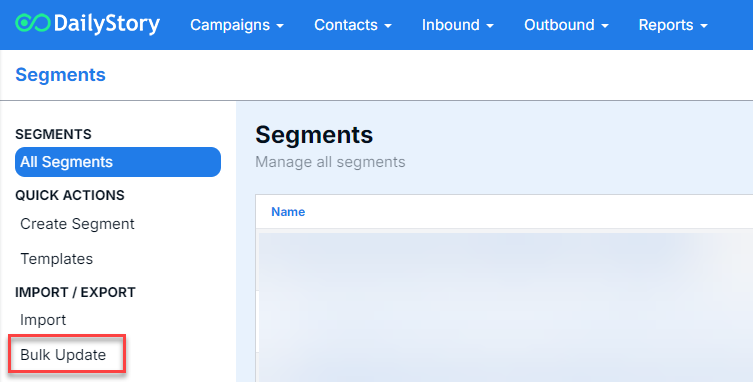
To access the bulk dynamic segment management tool navigate to Contacts > All Segments.
Look for Bulk Update:
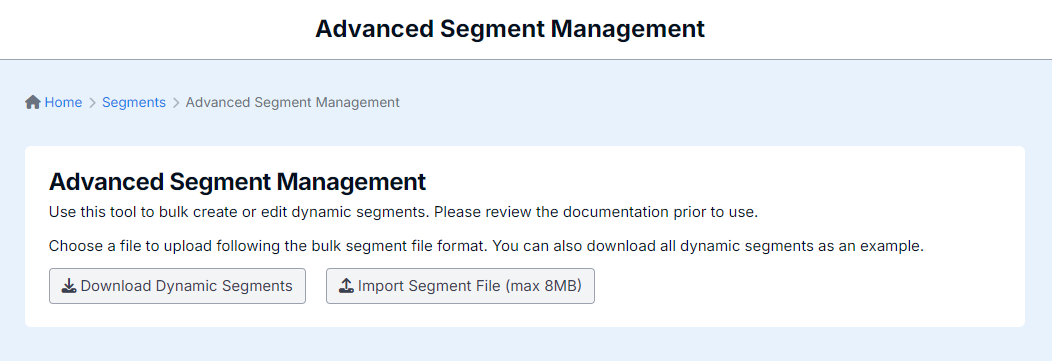
The below screen will appear:
Bulk edit segments directly in DailyStory
You can now bulk edit segments directly within the segment itself, with no CSV download or import required. Changes are applied in place, making this the fastest way to update many segments at once.
The following fields can be edited directly:
| Field | What you can change |
|---|---|
| Name | Rename segments, for example to follow a consistent naming pattern. |
| Description | Add or update the segment description. |
| Search | Update the search criteria that determines who is included in the segment. |
| Status | Set the segment status to Active, Paused, or Deleted. |
Use direct editing for quick changes such as renaming segments, adjusting search criteria, or activating, pausing, and deleting segments. Use a CSV import when you are creating many new segments or prefer to prepare changes offline in a spreadsheet.
What is the bulk segment file format
When working with bulk management of segments, the file format is a comma separated value (CSV) file with a specific column names. A CSV file is editable in any spreadsheet software (Excel, Google Sheets, etc.).
RecommendedUse the Download Dynamic Segments button to download your existing segments or to use as a template.
Column names used for bulk create and update
The table below identifies the column names used in the bulk segment CSV file.
| Column Name | Description |
| Segment Id | The numerical id of the segment to update. If the id is not present this instructs the bulk import to create a new segment. |
| Name | The name of the segment. Required. |
| Description | The description of the segment. Optional. |
| Search | The search criteria of the segment. Required. |
| Status | The status of the segment: Active, Paused, Deleted. If blank or not present, the status of the segment is unchanged. |
| Is Call List | True/False indicating if the segment is used in call lists. Optional. |
How to create or update existing segments
Edit the CSV file, ensuring the above columns are included, then click the Import Segment File and select your .CSV.
ImportantWhen editing an existing download of your dynamic segments to modify, only include rows for segments you want to update or create.
Update existing segments
If the row includes a numerical value for the segment id this instructs the import to update the segment with that id. If no segment is found for that id it is logged as an error.
Search criteria validation
During import the search criteria will have a light validation done to ensure if conforms to a valid search format. If it does not, an error is logged for that row.
Frequently Asked Questions
Below are some frequently asked questions about bulk segment management.
Can I use this to bulk delete, activate or pause segments?
Yes. You can change the status of segments to Active, Paused, or Deleted directly within the segment itself when bulk editing, with no file required.
You can also change status with a CSV import. Include the Segment Id column and the appropriate status. If the status is not present, the segment's status will not be changed.
Do I still need a CSV file to bulk edit segments?
No. Existing segments, including their status, can be bulk edited directly within DailyStory. The CSV import remains available and is best suited for creating large numbers of new segments or preparing changes in a spreadsheet.
I received an error that my search text was invalid, what does that mean?
Dynamic segment rely on a search string that is used to determine who is included in the segment. If the search string is malformed or has clear errors, you'll receive an error message. This can include searches that don't start ws=, search text that is enclosed in quotes, and more. While we do our best to validate your search criteria during import, there can still be other errors such as misspellings.
Is there a limit to how many segments I can create, delete, or update at once?
Technically no, but we generally recommend keeping it under 100 segments. However, we have tested with larger numbers of segments too.
What does it mean if I receive an error that no changes were made?
When updating segments we compare the current name, description, search, etc. if they are the same as what the segment is already set to this is flagged as an error as no changes were made.