BigCommerce is a e-commerce platform offering software-as-a-service (SaaS) services for building and hosting online stores. By integrating BigCommerce with DailyStory, you can leverage the DailyStory marketing automation platform to seamlessly send emails, text messages, push notifications and more.
In BigCommerce, go to Settings > API > Store-level API accounts and create an account. See the BigCommerce documentation for the current steps. Give the account read access to Customers, Orders and Products.
BigCommerce shows the Client ID, Client Secret, Access Token and API Path once, when the account is created. Save them before closing the dialog.
User Account Settings > Integrations.Configure.Save button.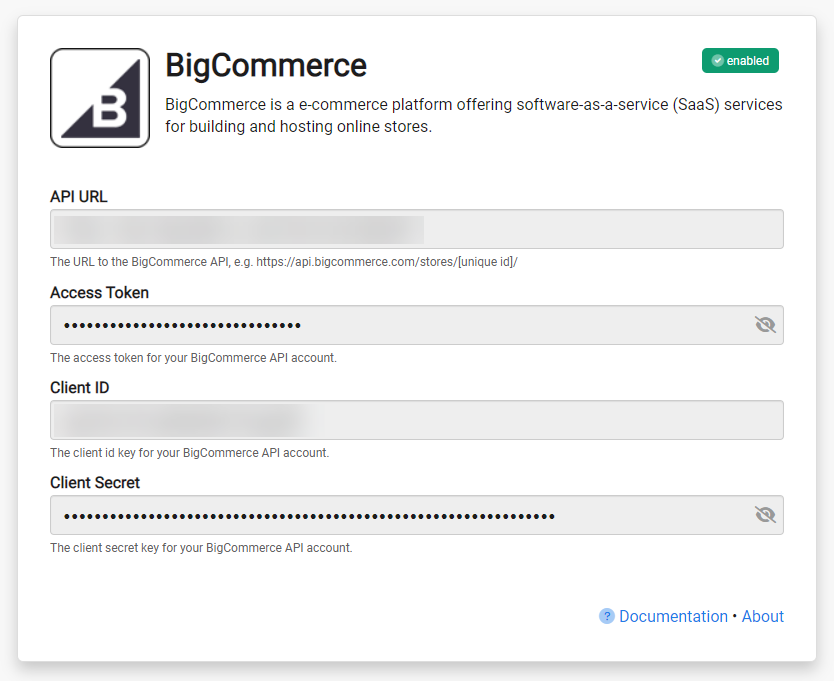 About the API URL
The API URL is the API Path shown by BigCommerce when the API account is created. It looks like https://api.bigcommerce.com/stores/[store hash]/.
Once BigCommerce integration is enabled, DailyStory:
The sync runs on a schedule and picks up customers and orders that have changed since the previous run.
BigCommerce sync is one-directional. Data from BigCommerce will always be considered the "source of truth."
DailyStory will sync the following standard fields from BigCommerce:
Address details come from the customer's residential address in BigCommerce.
Every field the BigCommerce integration creates on a contact record, in addition to the standard fields listed above. These appear in the BigCommerce group on the contact profile and can be used in segments.
| Field | What it holds |
|---|---|
| Id | The BigCommerce customer id |
| Order Status | The status of the most recent order |
| Date Last Order | When the most recent order shipped |
| Last Order Value | The total of the most recent order, including tax |
| Purchased Products | The products this customer has bought |
| Total Orders | How many completed and shipped orders this customer has placed |
| Total Sales | Lifetime spend across those orders |
| First order date | When this customer first ordered |
| Last order date | When this customer most recently ordered |
If you need additional fields imported from BigCommerce that are not listed here, please contact us for assistance.
DailyStory tracks the status of every BigCommerce order. When an order moves from one status to another, the change starts the matching automation trigger.
| BigCommerce order status | Automation trigger |
|---|---|
Pending | When cart abandoned |
Declined | When payment is declined |
Completed | When cart ordered |
Shipped | When order fulfilled |
To build an automation on one of these triggers, see the Abandoned Cart Campaign guide.
BigCommerce uses a fixed set of order statuses. The full list — Incomplete, Pending, Shipped, Partially Shipped, Refunded, Cancelled, Declined, Awaiting Payment, Awaiting Pickup, Awaiting Shipment, Completed, Awaiting Fulfillment, Manual Verification Required, Disputed and Partially Refunded — is synced to the Order Status field, so a segment can be built on any of them. The triggers above fire for the four statuses shown.
When an order reaches Completed or Shipped, DailyStory records a sale for each item in that order against the customer's contact record, and updates Total Orders and Total Sales.