No. Creating a warm-up divides your segment into cohorts and builds a segment for each day, but nothing is scheduled and nothing is sent. The warm-up stays a draft until you press Start warm-up on the monitor page.
When you send from a new sending domain, mailbox providers such as Google, Microsoft and Yahoo have no history to judge you by — and no history is treated with suspicion rather than neutrality. Sending your entire list on the first day from a domain they have never seen is one of the fastest ways into the spam folder.
The Email Warm-up tool introduces your list gradually. You choose a segment and an email, and DailyStory divides the segment into daily cohorts of increasing size, sends one cohort a day, and checks the results of each day before deciding whether to send the next.
A warm-up is worth running any time the mailbox providers have nothing to go on:
If you have been sending steadily from the same domain for months and your volume is not changing, you do not need a warm-up.
Your sending domain must be set up and verified first. A warm-up builds reputation for a domain the mailbox providers can authenticate, so running one before your DNS records are in place builds no reputation at all — it simply spends your best contacts for nothing.
The Email Warm-up tool becomes available from Account Settings > Email Marketing once your sending domain has validated. You will find the link in the Sending Domains section, alongside your DNS settings.
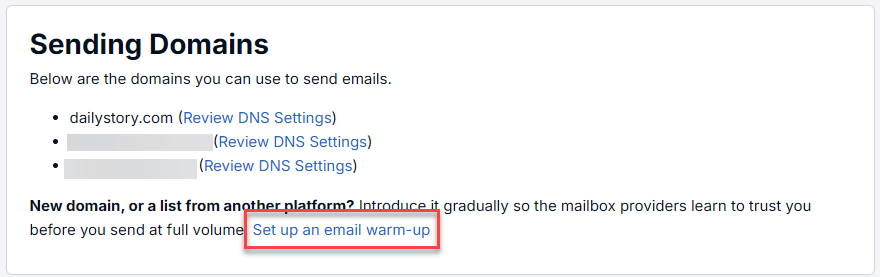
Your segment needs at least 5,000 mailable contacts. Below that a warm-up cannot do its job: the daily cohorts are too small for a bounce or complaint rate to tell you anything reliable, and the volume is low enough that mailbox providers will not read it as a new sender arriving at scale.
The Start a Warm-up screen has several sections:
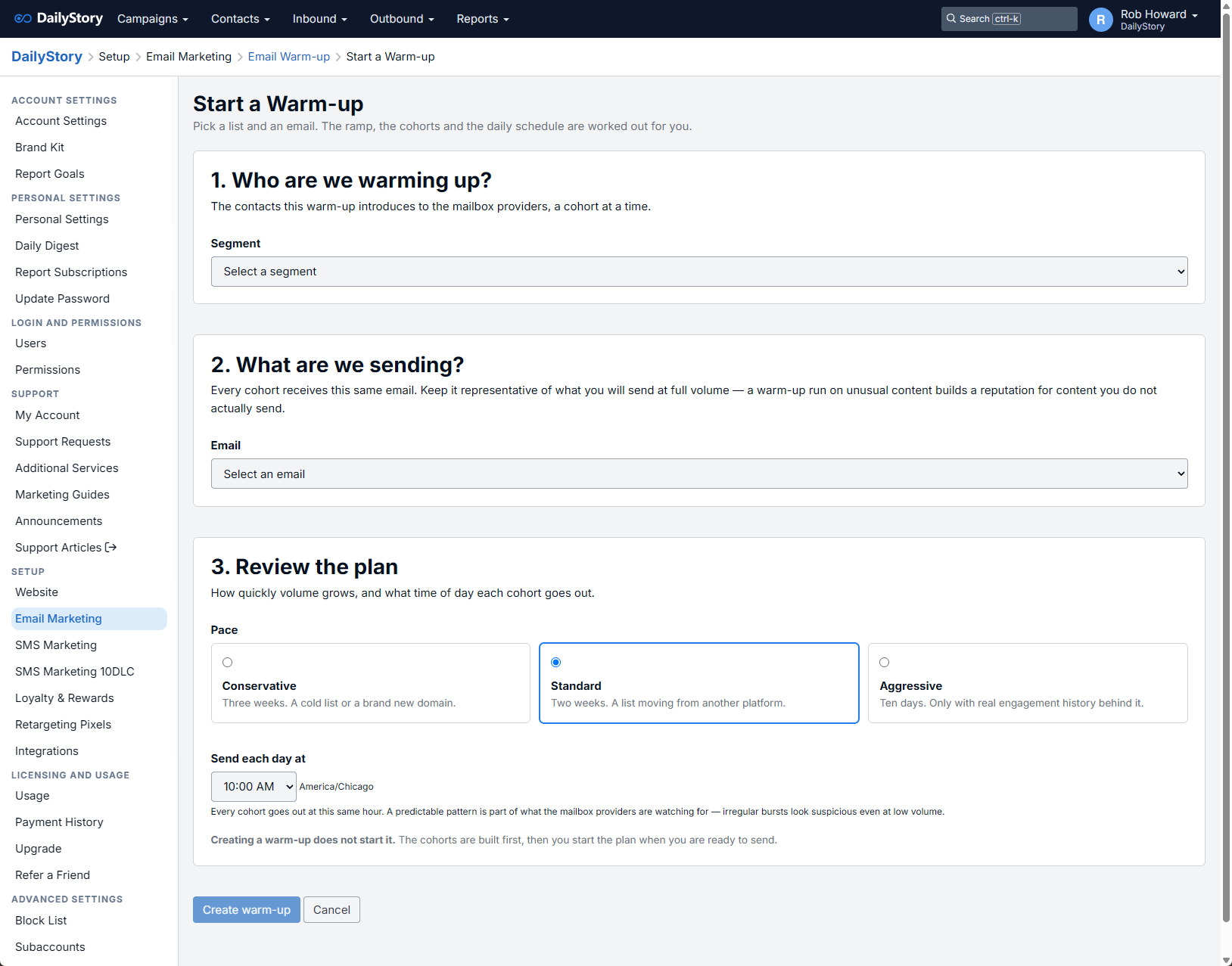
Select the segment you want to introduce. This can be a static or a dynamic segment — the cohorts cut from it are fixed either way. The list must have 5,000 contacts reachable by email.
DailyStory then shows you how many contacts can actually be mailed. Contacts who have opted out, are marked do-not-contact, or have no email address are excluded before the plan is built, so the cohort sizes you approve are the sizes that will really be sent. You will also see how many addresses have never been verified. You can continue anyway, but this is the number most worth acting on first.
Select one email. Every cohort receives this same message. Choose something representative of what you will send at full volume — warming up with unusual content builds a reputation for content you do not actually send.
Choose a pace:
| Pace | Length | Best for |
|---|---|---|
| Conservative | About three weeks | A cold list, or a brand new domain |
| Standard | About two weeks | A list moving from another platform |
| Aggressive | About ten days | A list with real engagement history behind it |
Then choose the hour each cohort goes out, in your account’s time zone. Every cohort is sent at that same hour. A steady, predictable pattern is part of what the mailbox providers are watching for — irregular bursts look suspicious even at low volume.
DailyStory shows the resulting ramp day by day before you commit, along with the mix of mailbox providers each cohort will contain.
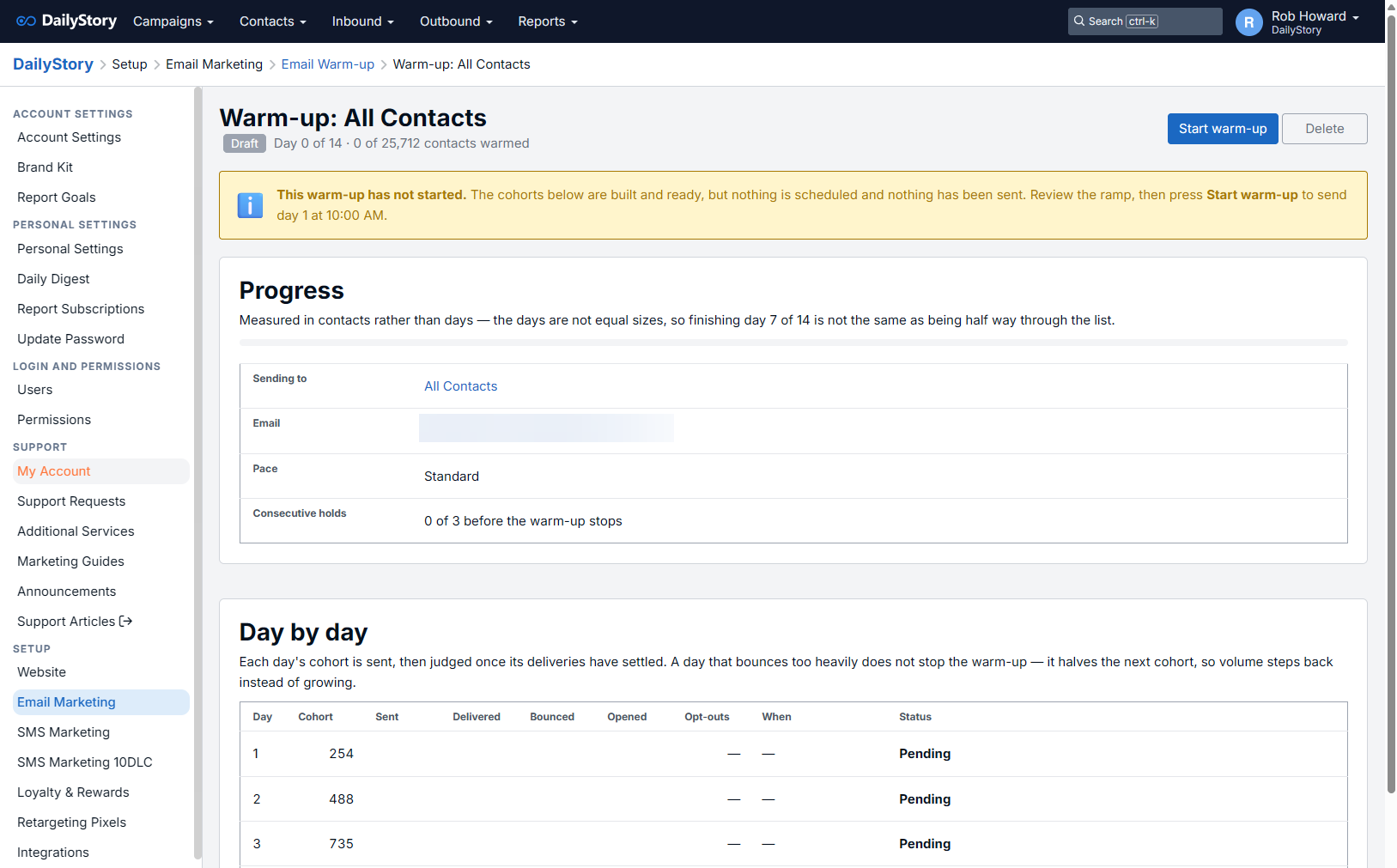
Creating the warm-up divides your segment into cohorts and creates a segment for each day. Nothing is scheduled and nothing is sent yet — the warm-up is a draft until you press Start warm-up on the monitor page. This gives you a chance to review the real cohorts before any email goes out.
Two things are true of every cohort, and both matter.
Each cohort holds the same mix of mailbox providers as your list. Google, Microsoft and Yahoo each form their own opinion of you, independently. If your first cohort happened to be three quarters Gmail addresses, you would be ramping hard at Google and not at all anywhere else. DailyStory spreads each provider evenly across every day so the ramp grows consistently in the eyes of all of them.
Your best contacts go first. Within each provider, verified addresses and recently active contacts are sent to earliest. Early engagement is what builds reputation fastest, so the days that set the tone are sent to the people most likely to open.
Cohort membership is frozen when the plan is created, and each day’s cohort is stored as its own segment in a folder named after the warm-up.
The monitor page shows the plan day by day: the size of each cohort, how many were sent and delivered, the bounce rate, opens and opt-outs, and the status of each day.
| Status | Meaning |
|---|---|
| Pending | Built, but not yet scheduled. |
| Scheduled | A send is queued and has not gone out yet. |
| Sent | Out, but too recent to judge. Results are read about twelve hours after a send. |
| Passed | Judged, and good enough to earn the next cohort. |
| Held | Judged, and the results were poor enough that the ramp stepped back instead of growing. |
| Failed | Results bad enough to end the warm-up. |
| Skipped | Never sent, because the warm-up ended before the ramp reached it. |
Each day carries a short note explaining what was decided and why, so a day that held is never a mystery.
This is the part a warm-up exists for. After each cohort has been out long enough for its deliveries and bounces to settle, DailyStory reads the result and decides what to do next.
If a warm-up stops on its own, work out what caused it before starting another. High bounces almost always mean the list needs verifying. See Troubleshoot Email Delivery.
You can pause a running warm-up at any time. Pausing cancels the send that has not gone out yet and holds the plan where it is; resuming picks up from the same point.
Stopping ends the warm-up for good. Days that were never sent are marked skipped, and the remaining contacts need a new plan when you are ready.
A warm-up works because your volume grows in steps the mailbox providers can get used to. Sending a full-volume campaign to the same list part way through is exactly the spike the warm-up is there to avoid, and it can undo weeks of work in an afternoon.
DailyStory will warn you when you schedule a message while a warm-up is running. The warning does not block the send — a small or transactional message may be perfectly reasonable — but treat a large one with care until the ramp has finished.
Below are some frequently asked questions about DailyStory's email warm up tool.
No. Creating a warm-up divides your segment into cohorts and builds a segment for each day, but nothing is scheduled and nothing is sent. The warm-up stays a draft until you press Start warm-up on the monitor page.
The next day, at the hour you chose. If your warm-up sends at 10:00am and you start it at 4:00pm, day 1 goes out at 10:00am tomorrow rather than immediately. Every cohort goes at the same local hour, and sending the first one at a different time would break the predictable pattern the warm-up is establishing. The monitor tells you the exact date and time day 1 will go out before you start, and again once it is scheduled.
Because the list is small enough that the pace cannot be honored. Each day's cohort needs at least 100 contacts for its bounce and complaint rates to mean anything, so a shorter ramp is used rather than days too small to measure. A list of 5,000 produces nine days whichever pace you pick. Standard reaches its full two weeks at around 11,000 contacts, and Conservative reaches three weeks at around 22,000. The plan shown before you commit is always the real one.
No. A hold halves the next cohort rather than skipping a day, so tomorrow sends less than today did instead of more. Sending continues because a gap is itself a signal mailbox providers read badly. The contacts split off move to the end of the plan, so the warm-up covers the same list and simply takes a day longer.
Only while it has not sent to anyone. A draft, or a paused warm-up whose next cohort has not gone out, can be deleted along with the daily segments it created. Once a warm-up has mailed anybody it can be stopped but not deleted — it is the record of what was sent and why each day was judged as it was, and the reporting for those sends depends on the cohort segments.
The warm-up restores it. Deleting a segment moves it to the deleted bin rather than removing its members, so when the warm-up reaches that day it puts the segment back and sends as planned. If the segment has been permanently removed there is nothing to restore, and the warm-up stops with a message naming the day it could not send. The cohort segments are best left alone in their folder until the warm-up finishes.
Yes, but be careful with large sends to the same list. DailyStory warns you when you schedule a message while a warm-up is running, and shows the warm-up on your dashboard for the same reason. A transactional message or a small send is usually fine; sending the whole list at full volume part way through is the spike the warm-up exists to avoid and can undo weeks of work.