URL Shorteners
URL Shorteners enable you to publish and share links (and QR codes) to important content and measure their click-through performance.
The service is similar to other link management platforms such as https://bit.ly. However, unlike stand alone link management tools, DailyStory's URL Shorteners are integrated into the overall marketing and sales funnel.
RecommendedYou do not need to create tracking links for email, text messages, social media, push notifications and any other content DailyStory sends to your contacts. This is done automatically through DailyStory's Link Management tools.
Testing a shortened URL
Use the Test URL button to test the URL Shorteners. This will open a new browser tab and automatically open the URL shortener.
The Test URL button adds the query string value ?__PREVIEWMODE=1 to the end of your URL shortened link. When this is included metrics for your URL Shortener are not counted.
When you use your URL Shortener make sure to use the shortened URL and not the URL created by the Test URL result.
Metrics tracked for URL shorteners
DailyStory automatically tracks metrics, such as unique clicks, on your links.
Tracking clicks to pages that do host the DailyStory beacon
If your URL Shortener redirects to a page hosting the DailyStory beacon, such as your website or a DailyStory landing page:
- Total Clicks
- Unique Clicks
- Converted Leads
- Accessing device (mobile, tablet or desktop)
- Keywords (when integrated with Google Ads or Bind Ads)
Anonymous visitors that convert on Web Form, Magic Form, Popup or through the API are shown in the Contact's and Lead's activity report. Also included is the link they originally clicked on.
RecommendedIf you are using retargeting pixels, DailyStory will automatically include your Retargeting Pixel when redirecting visitors to your Destination URL.
Tracking clicks to pages not hosting the DailyStory beacon
If your URL Shortener redirects to a page that is not hosting the DailyStory beacon, such as an article on CNN, DailyStory will track the total click throughs and unique clicks based on the visitor's IP address.
Difference between conversion tracking and click tracking
It's important to note the difference between conversion tracking and click tracking metrics.
Conversion Tracking reporting on inbound links (content you own) whereas Click Tracking reports on outbound links (content you don't own). Conversion Tracking is much more accurate because individual visitors are tracked vs. unique IP addresses.
Better Click Tracking
While Click Tracking doesn't provide the same benefits as conversion tracking, there are some advanced configuration options available to improve your metrics.
- Retargeting Pixels - DailyStory will include your retargeting pixels.
- Add a subdomain - Request to add your own subdomain to DailyStory. This will allow us to write the tracking code to visitor's browser even if Link Management redirects them to an outbound link where the DailyStory tracking tag is not running.
Create a URL Shortener
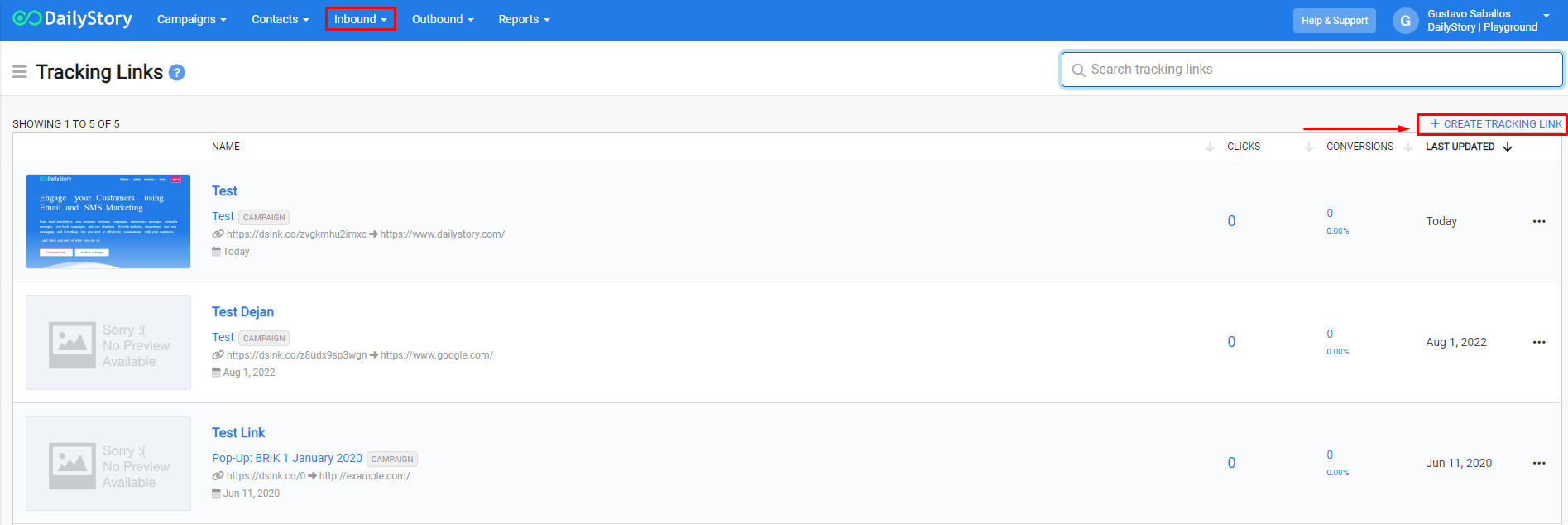
To create a URL Shortener, navigate to Inbound > URL Shorteners. From here you can either enter a URL and press return or click + Create in the main URL Shortener menu.
Once you click Create the editor will generate the URL Shortener and a QR Code. The URL Shortener is what you publish or share. When people click your URL Shortener or scan your QR Code, they will be redirected to the Destination URL.
Click Save Changes. Once your URL Shortener is saved, the URL Shortener editor will switch from create to edit mode. In edit mode there are more options for how DailyStory manages your URL Shortener.
Edit a URL Shortener
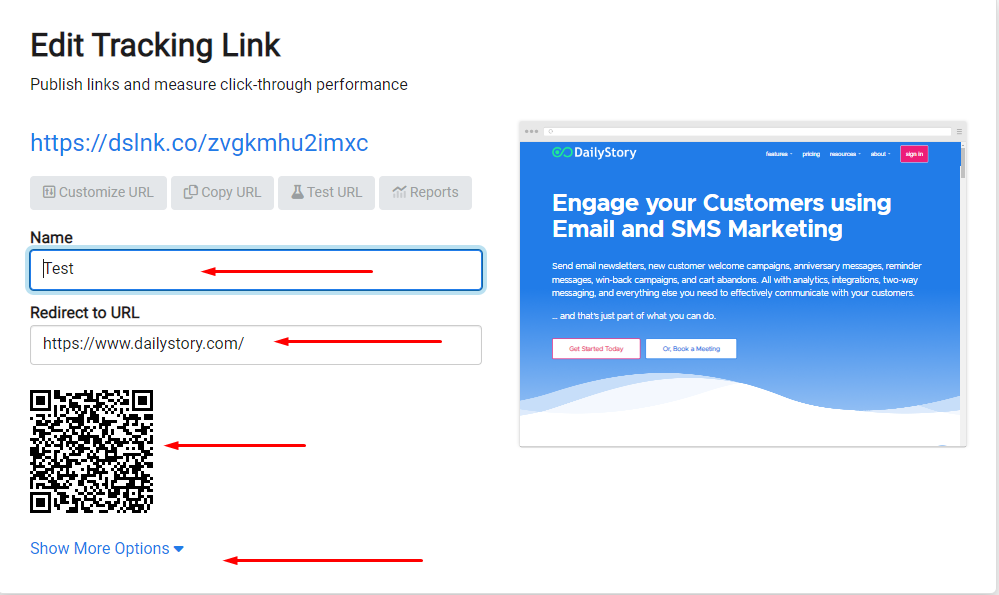
The URL Shortener edit screen is similar to the create screen, but with a few additional options.
When you enter or change the URL shortener, DailyStory will automatically fetch the URL set the Name to the title of the page and provide a preview of the page.
When editing your URL shortener you may have seen the "More Options..." link. Clicking this will expand additional options you can use to configure your URL Shortener.
Other URL Shortener Options
Click More Options... in the URL Shortener editor to expand the additional options. The first thing you see is Google Ads and Bing Ads options.
Tracking Ad Clicks
DailyStory provides tracking links for Google and Bing Ad platforms. This integration enables you to see which ads created new leads and the keywords associated with those leads.
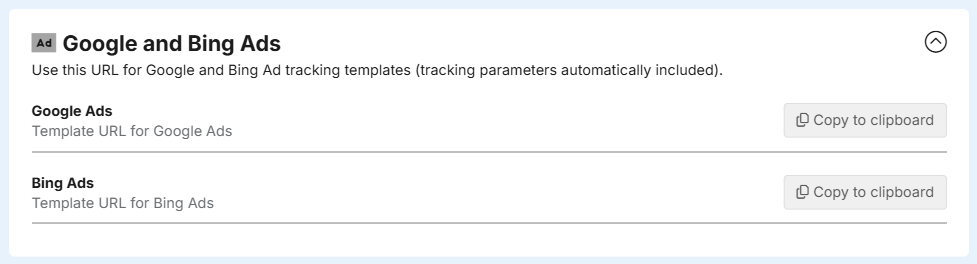
Using these URL shortened links gives DailyStory information about: device type, keywords, ad groups and more.
RecommendedIf you are using retargeting pixels with your ads the URL Shortener link will automatically include your Retargeting Pixel when redirecting visitors to your Redirect to URL.
Keyword Association
DailyStory does receive data on the keywords that attracted clicks. But we can only report on the keywords associated with your ad.
For example, if your paid ad keyword included 'apple' and the search was 'apple watch guide' DailyStory will only receive the 'apple' keyword for reporting purposes. Thus, the more keywords and terms used in your ad, the more precise DailyStory's keyword reporting is.
Google Ads
Follow the instructions below to use your URL Shortener with Google Ads. Google Ads support a Tracking template that can be used for DailyStory URL Shorteners.
- Create Google Ad
Create a Google Ads ad or edit an existing ad.
- Click + on Ad options
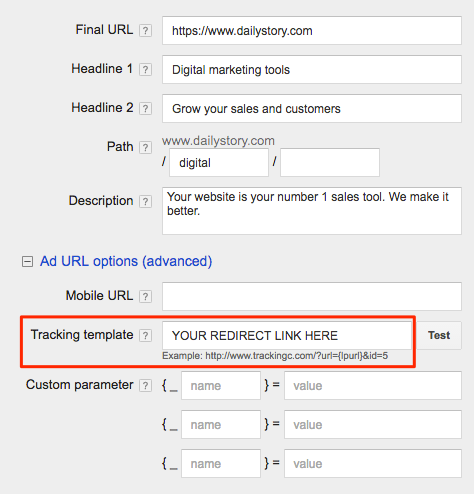
Click [+] on Ad URL options (advanced) as shown in the image below:
- Copy/Paste Tracking Template URL
Copy/Paste the Google Ads Tracking Template URL into the Tracking template text box (highlighted in red) above.
- Save
Finally, save your Google Ads ad. You can also test the links too.
Bing Ads
Follow the instructions below to use your URL Shortener with Bing Ads. Bing Ads support a Final URL that can be used for DailyStory URL shortener Tracking.
- Create Bing Ad
Create a new Bing Ads ad or edit an existing ad.
- Set Final URL
When editing the ad, select Final URL (recommended) as shown in the image below:
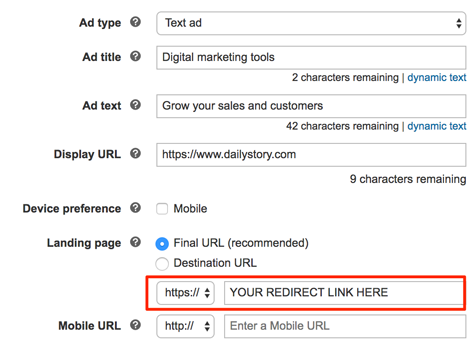
- Copy/Paste Tracking Template URL
Copy/Paste the Bing Ads Final URL into the text box (highlighted in red) above.
- Save
Finally, save your Bing Ads ad. You can also test the links too.
Google Analytics Integration with UTM codes
Using Google Analytics integration, DailyStory Link Management can pass additional Google Analytics data with your Destination URL.
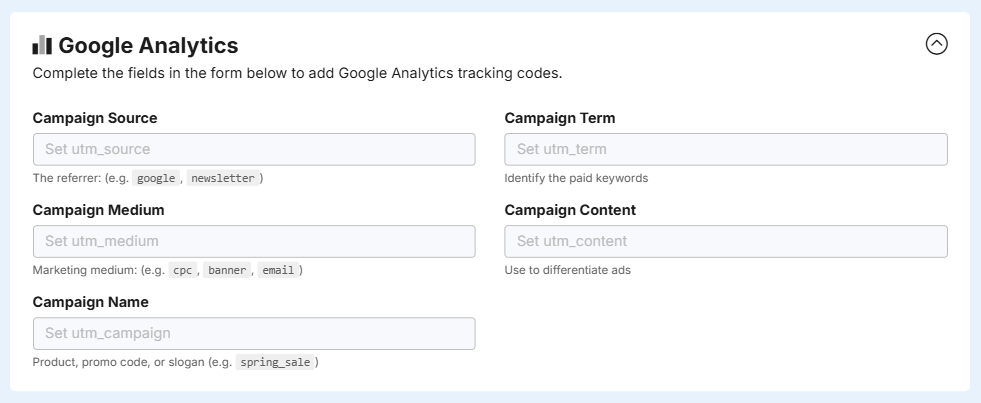
Configuring Google Analytics enables you to pass additional campaign details to Google Analytics and DailyStory.
DailyStory automatically sets Google Analytics UTM codes if none are provided. Learn more about how DailyStory integrates with Google Analytics.
RecommendedIn addition to Google Analytics data, you can append any additional data in the query string to your URL shortener. DailyStory will automatically forward the query string data to your Destination URL. This is handy if you have special values that you want to capture.
Advanced Options
URL Shorteners provides several advanced options for managing your links.
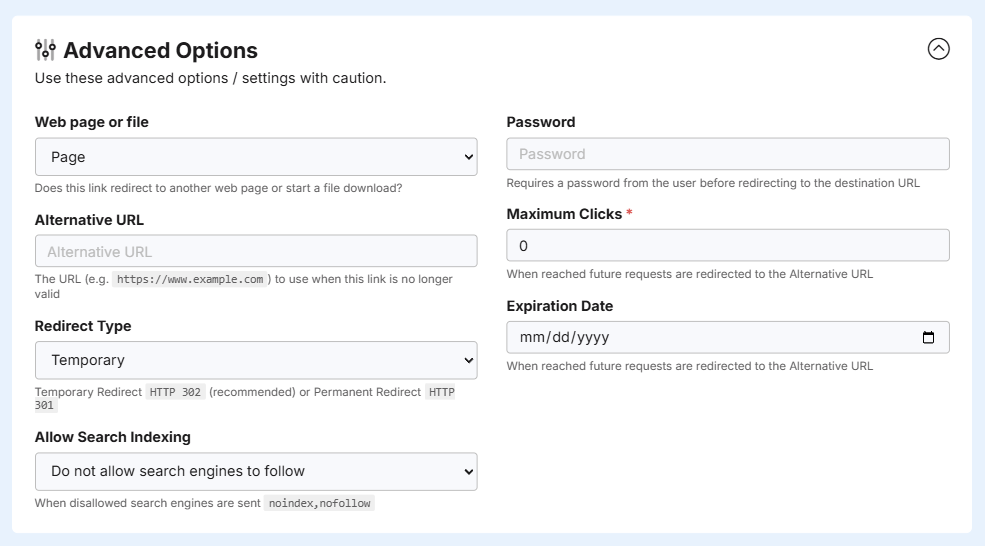
Web page or file
By default, DailyStory presumes the Redirect to URL is a web page. If it is not a web page, but a file (such as a PDF), you can tell DailyStory's to treat the results from the Redirect to URL as a file. Doing so will download the file to the client's browser by setting the appropriate HTTP headers.
Alternative URL
If your URL shortener expires or a password is invalid, DailyStory will redirect people to this URL. If you do not provide an Alternative URL and the URL is no longer valid, visitors will be redirected to a generic DailyStory URL indicating that the content is no longer available.
RecommendedIt's easy to create an Alternative URL by creating a new Landing Page and using it as the Alternative URL.
Redirect Type
The Redirect Type Temporary (the default) sends an HTTP 302 status code when DailyStory redirects to your Redirect to URL. Setting the Redirect Type to Permanent sends an HTTP 301 status code.
WarningIt is recommended that the Redirect Type is set to Temporary unless you fully understand why a HTTP 301 is needed.
Password
Set a password that will be required before DailyStory redirects to your Redirect to URL. This is useful if you have content you wish to share, such as a PDF, but want to require people to authenticate prior to accessing it.
Maximum Clicks
This option allows you to set the maximum number of clicks allowed for the URL shortener. Once this limit is reached, visitors will be redirected to your Alternative URL or will receive a generic DailyStory URL indicating that the content is no longer available.
Expiration Date
This option allows you to set a date after which the URL shortener expires. Once this date is reached, visitors will be redirected to your Alternative URL or will receive a generic DailyStory URL indicating that the content is no longer available.
Allow Search Indexing
By default shortened URLs are configured to not allow search engines to follow shortened URLs as this can cause unwanted clicks and other metrics from search engine traffic. When this option is set the following HTTP headers are returned:
"X-Robots-Tag": "noindex,nofollow""Content-Security-Policy": "referrer always""Referrer-Policy": "unsafe-url"
When allowed, these headers and not written and search engines can follow shortened URLs.
Frequently Asked Questions
Below are some frequently asked questions about URL shorteners.
I use another Link Management platform, can DailyStory integrate with it?
No, we currently do not integrate with other Link Management solutions. DailyStory's Link Management is part of the DailyStory platform and is designed to bring together many different tools into a single integrated solution. In the future we may consider integrating with other Link Management platforms.
My URL Shortener isn't getting any clicks
There is a 15-20 minute delay from when a URL Shortener link is clicked until the metrics start showing up. However, if you still aren't seeing any metrics it may be because the URL Shortener isn't setup correctly.Verify that the URL Shortener works using the Test URL Shortener button. If the link is redirecting properly to your Destination URL, next check that the link you are sharing doesn't include the ?__PREVIEWMODE=1. This is a special instruction to tell DailyStory Link Management not to record metrics. Finally, if your URL Shortener still isn't working, please Contact Us. We'd be happy to help.
How does DailyStory know if my Destination URL is running the DailyStory Tracking Tag?
When you save your URL Shortener, DailyStory Link Management will validate your Destination URL and check if the DailyStory Tracking Tag is installed. There is nothing you need to do.
Do I need to create URL Shortened links for my emails or text messages?
No, just create content in DailyStory and add links to whatever content you want. DailyStory Link Management will update your content and replace your links with URL Shortener before the content is sent.
What is a Unique Click vs. a unique IP address?
When a link is redirected to a URL running the DailyStory Tracking Tag, the Tracking Tag will receive information about the URL Shortener as a Unique Click and use this when it records the visit to the page. Later these visits, and link clicks, are aggregated into metrics for reports. This is distinct from a Unique IP address - Link Management receives the redirect request, but if the Destination URL is not running the DailyStory Tracking Tag a Unique Click cannot be recorded.
Why should I setup my own subdomain for DailyStory?
When someone clicks on your Tracking Link, DailyStory Link Management receives the request to our domain (https://dlystr.io). This is a special short-code domain setup for our customers to use. However, requests that use this short-code URL and then redirect to a URL that is not running the DailyStory tracking tag can only track clicks not conversions. If you provide your own URL for DailyStory to use that shares your domain, DailyStory can write a tracking cookie for your domain.
How secure is the password on my URL Shortener?
Requiring a password before DailyStory Link Management redirects to your Destination URL does not protect your content if the Destination URL is shared. If you require security for a file or page you wish to share to prevent access to the resource at the Destination URL, then you should consider more secure options.
What happens when I delete a URL Shortener?
When you delete a URL Shortener, the URL Shortener may continue to work, but will soon be unavailable and future clicks will be redirected to a generic DailyStory page indicating that the link is no longer available. Deleted URL Shorteners are moved to the Trash and can be recovered. However, after several days the URL Shortener and all metrics associated with it will be permanently deleted.
I'm no longer using the URL Shortener, how do I keep the metrics?
If you are no longer using a URL Shortener, but wish to retain metrics for the URL Shortener, you can Archive the URL Shortener. URL Shorteners that are archived are no longer usable, but are not deleted.
Can my Destination URL redirect to another redirect URL?
Generally speaking, multiple redirects is considered bad and you risk Google, and other search engines, penalizing your links. We recommend that any Destination URL that DailyStory Link Management redirects to is the URL you want your visitors to end up at.