Send Time Optimization
Send time optimization delivers each recipient their message at the hour they are most likely to engage, rather than sending everyone at the same moment. When you schedule an email with send time optimization enabled, DailyStory looks at when each contact has actually engaged with your marketing in the past and places their message accordingly.
How send time optimization works
Every night, DailyStory builds an engagement profile for each of your contacts from the last six months of activity. The profile records the hours of the day that contact tends to engage in. When you schedule an optimized email, each recipient is placed at their best available hour.
Contacts fall into one of three groups:
- Contacts with their own profile. A contact who has engaged at least three times in the last six months gets a profile built from their own behavior, and is placed at their personal best hour.
- Contacts using your account pattern. A contact without enough history of their own is placed using your account's overall engagement pattern, built from everyone who does engage with your marketing.
- Contacts with no signal. If there is nothing to go on, the contact is delivered at exactly the time you scheduled. Send time optimization only ever moves a contact when there is evidence to support it.
What DailyStory measures
Engagement profiles are built from actions a person actually took:
| Signal | What it tells us |
|---|---|
| Email link clicks | The contact opened your message and acted on it at that hour |
| Text message link clicks | The contact acted on an SMS at that hour |
| Tracked website visits | The contact was active on your site at that hour |
Clicks carry more weight than website visits, because a click on a link in your message is an unambiguous response to your marketing. You can review the click activity behind these profiles using DailyStory's click performance and link conversion reporting. Website activity is attributed to a contact through the DailyStory beacon, including across multiple domains if you have configured cross-domain tracking.
Why email opens are not used
Email opens are deliberately excluded. Apple Mail Privacy Protection and corporate security scanners automatically load tracking images within minutes of delivery, whether or not a person ever looked at the message. That means the hour of an open is frequently just the hour you sent. Training on opens would gradually push send time optimization back toward the hour you already send at, and then report that as an improvement. Clicks and website visits require a person.
The rules for when a message can be placed
Send time optimization operates inside firm limits so an optimized send stays predictable:
- Same day only. A message scheduled for Tuesday is delivered on Tuesday. Optimization never moves a recipient to the following day.
- Daylight hours only. Recipients are placed between 8:00 AM and 7:00 PM in your account's time zone.
- Never earlier than you scheduled. A message is only ever moved later within the allowed window, never before the time you chose.
- Spread within the hour. Messages placed in the same hour are distributed across that hour rather than sent all at once.
Because the daylight window is measured against your account's time zone, it is important that your time zone is set correctly in Account Settings. If no time zone is configured, DailyStory defaults to UTC, which will shift the window. See Account Settings Frequently Asked Questions and Personal Settings for more on how time zones are applied.
If you schedule a message after the daylight window has closed for that day, no optimization is applied and every recipient is delivered at the scheduled time.
Enabling send time optimization
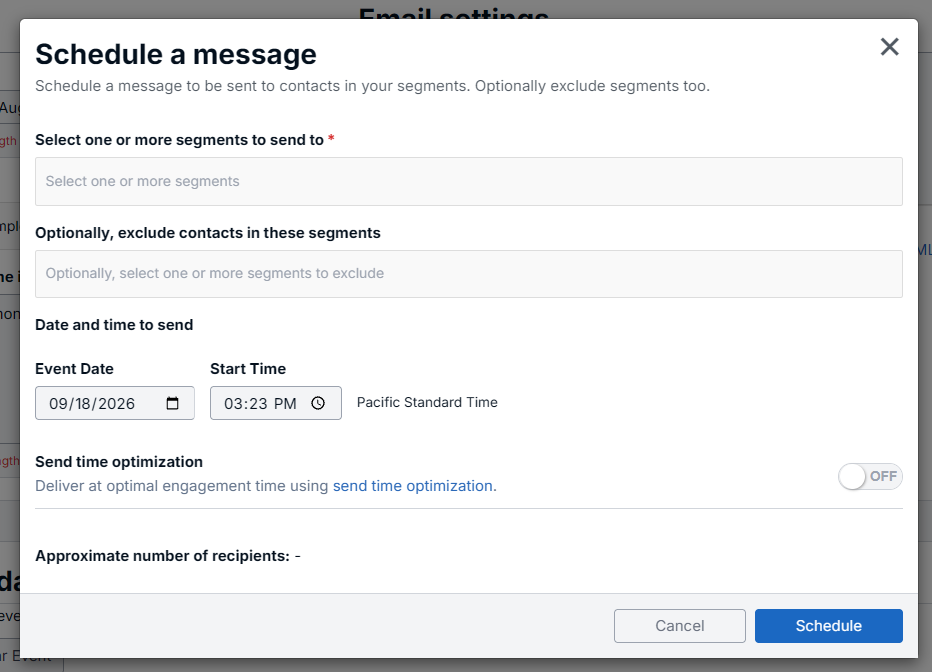
Send time optimization is set per schedule, so you can use it on the sends where it matters and leave it off elsewhere. When you open the message scheduler, enable the send time optimization option before scheduling.
- Build your email and select Schedule to open the message scheduler. See Scheduling an Email for the full walkthrough.
- Choose your segments and set the date and time you want the send to begin.
- Enable Send time optimization.
- Select Schedule.
Existing schedules are unaffected. Send time optimization is off by default, so any send you do not explicitly enable it on continues to deliver exactly as it always has. For more on scheduling options generally, see Sending and Scheduling Emails.
Availability
Send time optimization is currently available for email when scheduling a message:
Frequently asked questions
Why were only some of my contacts moved?
Only contacts with recent engagement history can be optimized. On a large list it is normal for a minority of contacts to have their own profile, with the remainder placed using your account-wide pattern or left at the scheduled time. Contacts you have not messaged recently, and contacts who open but never click, will not have a profile.
Does send time optimization delay my send?
It can move individual recipients later in the day, within the daylight window and never past it. The send still begins at the time you scheduled, and contacts whose best hour is at or before that time are delivered right away.
Will my whole send still complete on the scheduled day?
Yes. Optimization is constrained to the same calendar day in your account's time zone. For general delivery timing expectations, see the Email Frequently Asked Questions.
How often are engagement profiles updated?
Profiles are rebuilt nightly from the trailing six months of engagement, so they follow changes in your contacts' behavior over time without any action from you.