WooCommerce is an open-source e-commerce plugin for WordPress. It is designed for small- to large-sized online merchants using WordPress. By integrating WooCommerce with DailyStory, you can leverage the DailyStory marketing automation platform to seamlessly send emails, text messages, push notifications and more.
Login to your WooCommerce account and see the WooCommerce documentation to generate the Consumer Key and Consumer Secret from your WooCommerce site.
User Account Settings > Integrations.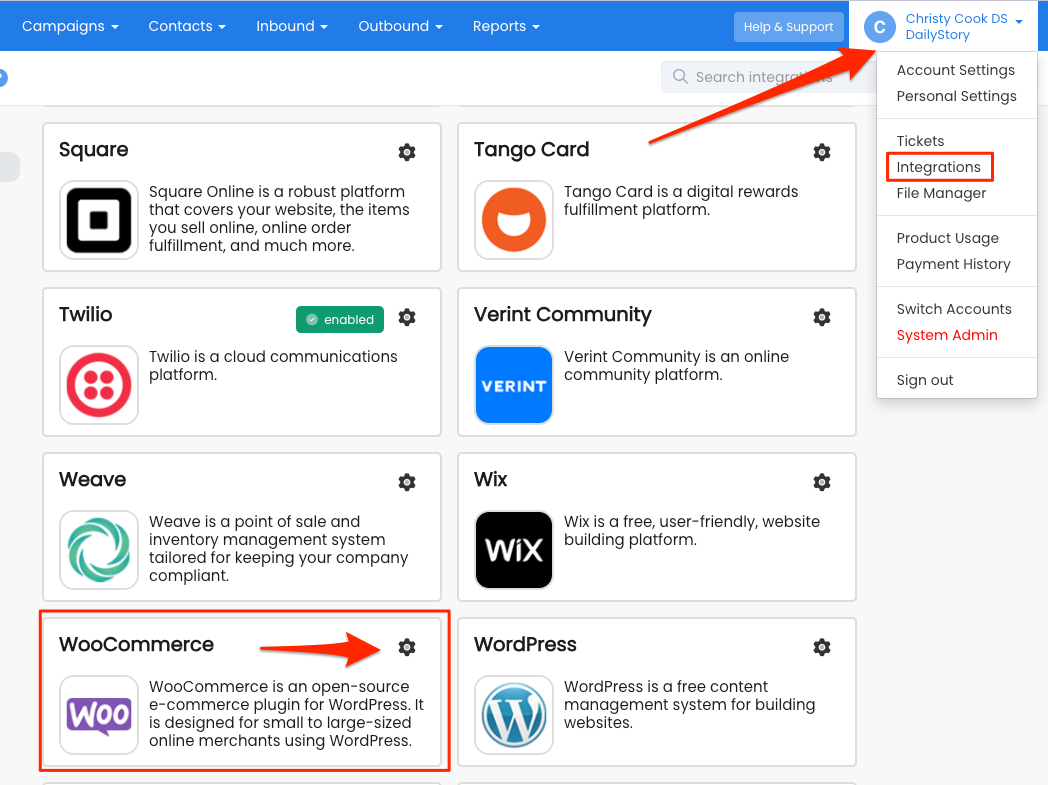
Configure.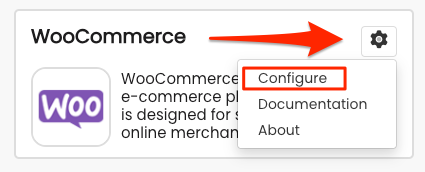
Save button.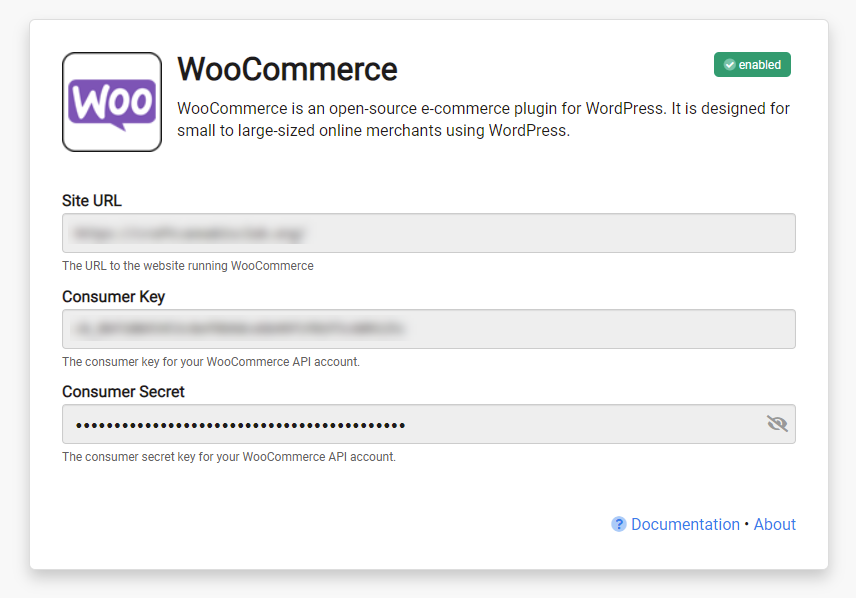
The WooCommerce integration supports an option that new customers synced from WooCommerce come into DailyStory as opted-out by default. This option requires the recipients are opted in separately.
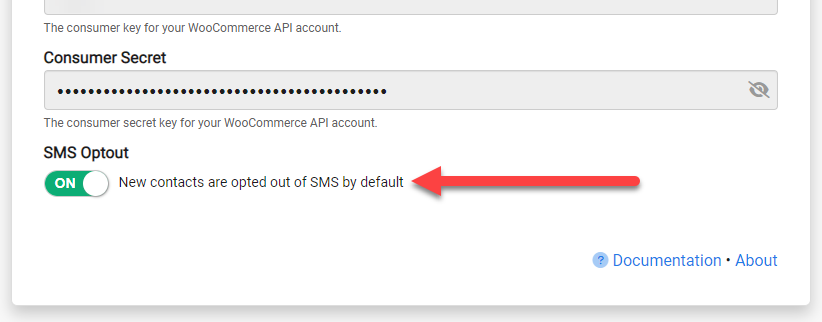
Once WooCommerce integration is enabled, DailyStory:
When WooCommerce integration is enabled, DailyStory automatically syncs data from WooCommerce.
DailyStory will sync the following standard fields from WooCommerce:
DailyStory also will automatically geocode (calculate the latitude and longitude) the contact record.
If you would like additional fields synced from WooCommerce, please submit a support ticket to our development team and we would love to accommodate you if possible.
Every field the WooCommerce integration creates on a contact record, in addition to the standard fields listed above.
| Field | What it holds |
|---|---|
| Id | The WooCommerce customer id |
| Date Created | When the customer registered in WooCommerce |
| Date Updated | When the customer record last changed |
| Status | The most recent order status, including custom statuses added by plugins |
| Date Last Order | When the most recent order was completed |
| Last Order Id | The WooCommerce id of the most recent order |
| Last Order Number | The order number as shown to the customer |
| Last Order Value | The total of the most recent order |
| Order Count | How many completed orders this customer has placed |
| Total Spent | Lifetime spend across all completed orders |
| Currency | The currency of the most recent order |
| Purchased Products | The products this customer has bought |
| Products Categories | The categories those products belong to |
| Coupon Codes | Coupon codes used on the most recent order |
| Cart Abandoned | When a checkout was started and not paid for |
| Cart Abandoned Url | A link that returns the shopper to their unpaid order |
| Purchase History | A structured record of every item purchased, with price and date |
DailyStory tracks the status of every WooCommerce order. When an order moves from one status to another, the change starts the matching automation trigger. Status changes are picked up whenever they happen, including on orders placed days or weeks earlier.
| WooCommerce order status | Automation trigger |
|---|---|
pending | When cart abandoned |
failed | When payment is declined |
completed | When cart ordered |
To build an automation on one of these triggers, see the Abandoned Cart Campaign guide.
Abandoned checkout is not the same as an abandoned cartIn WooCommerce, the pending status means a shopper reached checkout and did not complete payment. That is an abandoned checkout. A shopper who adds items to a cart and leaves before reaching checkout never creates an order in WooCommerce at all, so there is nothing for the sync to see. To reach those shoppers, enable store activity tracking in the DailyStory WordPress plugin.
Many WooCommerce extensions add their own order statuses, such as partially-shipped or the statuses used by WooCommerce Subscriptions. DailyStory syncs these exactly as your store reports them, so you can build segments on any status your store uses. The triggers listed above fire for the core statuses shown.
When an order reaches completed, DailyStory records a sale for each item in that order against the customer's contact record. The amount recorded is the line total the customer actually paid, after any coupon discounts have been applied.
The WooCommerce integration syncs customers and orders from your store. To also capture what shoppers do on the storefront itself, install the DailyStory WordPress plugin. With the plugin in place, DailyStory additionally receives:
See WordPress Integration for details on enabling store activity tracking.
When a checkout is abandoned, DailyStory records the date on Cart Abandoned and a link back to the unpaid order on Cart Abandoned Url. Use that link in your recovery email or text message so the shopper returns straight to payment:
Finish your checkout: {{profile.woo_abandoned_url}}
Both fields are cleared as soon as the order moves on from pending, so a recovery automation stops targeting a customer who has since paid.
If an order is later refunded or cancelled, the sales recorded for it are removed, and the customer's Order Count and Total Spent fall back accordingly. Both figures are recalculated from the recorded sales on every sync rather than added up as orders arrive, so they stay correct even when the same order is synced more than once.
Purchase History is a structured record of everything a customer has bought, rather than a flat list of product names. Each purchase carries three values: Item, Price and Purchase Date.
Because each purchase is its own record, a segment can ask questions the flat product list cannot, such as "bought a particular item between two dates for more than a given amount". Purchase history is built from the sales already recorded for your store, so a store with existing order history sees it appear without needing a re-import.
When the WooCommerce integration is enabled, the following dynamic segments are created automatically. They are provided as starting points and can be used, edited or deleted:
A WooCommerce conversion funnel is created when the integration is enabled. With the DailyStory WordPress plugin installed, completed orders report their value to that funnel, so store revenue can be attributed to the campaigns and automations that produced it.