A/B Testing Guide
A/B testing (also known as split testing) is a process of showing two or more variants of the same email to different segments of customers at the same time and comparing which variant drives more conversions.
When to use A/B testing
You can use A/B testing for anything from testing subject lines, call-to-action buttons, link placement or content. A/B testing is a great way to increase the open and click-through rates of your marketing, and even decrease opt-outs.
How it works
- Select an email or text message to test.
- Choose the number of variants to test.
- Configure how they're sent and measured.
- Schedule the emails or text messages to be sent.
- Once the test has concluded and the winning version has been found, the system will automatically send the winning version to the rest of your list.
Examples of what to test
You can test many almost any aspect of your marketing pieces to improve results, but here are a few ideas to help you get started:
- Subject lines - your customer's first impression of what's inside.
- Length - how much content do your customers prefer? Research shows 60-70 characters is optimal.
- Word order - the order in which you place your words in the subject line or preview text matters.
- Personalization - using your customer's first name, etc.
- Visuals - the use and placement of images, icons and emojis.
- Call-to-action links - buttons or text, placement, wording, size and coloring.
Tips for effective testing
- Decide what your "success metric" is; do you care more about opens or clicks?
- Test only one variable at a time - have a basic hypothesis you are trying to prove out.
- Test your variants at the same time.
- Don't make any mid-test changes.
- Document your results so you can build on what you learn.
RecommendedRemember, the ultimate goal is conversions!
Accessing A/B Tests page
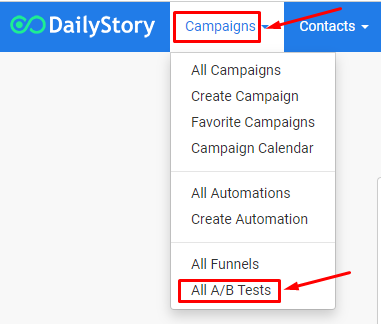
You can navigate to your A/B Tests page from the home navigation menu Campaigns > A/B Tests. This page displays all of your created A/B tests for both email and text messages.
A/B Tests page layout
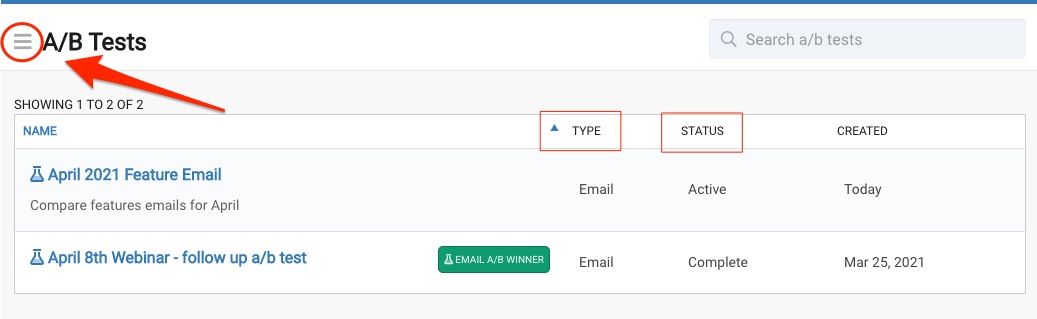
Your A/B Tests page will display all of your created A/B tests across the platform. From the top of the page you can access the A/B Tests Menu (3 lines/hamburger menu) to quickly create a new A/B test or access our help docs.
From the itemized list, you can see the type, status and date created. To edit or access one of A/B tests, just click on the title.
Resources to help you get started with A/B Testing.
Related articles from our blog: