DailyStory is built on a small set of concepts that work together: contacts, segments, campaigns, leads, assets and automations. Once you understand how they relate, the rest of the platform follows naturally. This article explains each concept, how they connect, and how DailyStory's approach differs from email-first tools such as Mailchimp.
At a high level, DailyStory works like this:
| Concept | Answers the question | Example |
|---|---|---|
| Contact | Who is this person? | Jane Smith, jane@example.com, member since 2023 |
| Segment | Which people share this trait? | Members whose membership expires next month |
| Campaign | What are we trying to achieve? | Membership Renewals |
| Lead | Is this person part of this campaign? | Jane, as a lead in Membership Renewals |
| Asset | What do we send or use to reach or capture people? | Renewal reminder email, renewal text message, renewal landing page |
| Automation | What happens, and when? | Email 30 days before expiry, text 7 days before, stop when renewed |
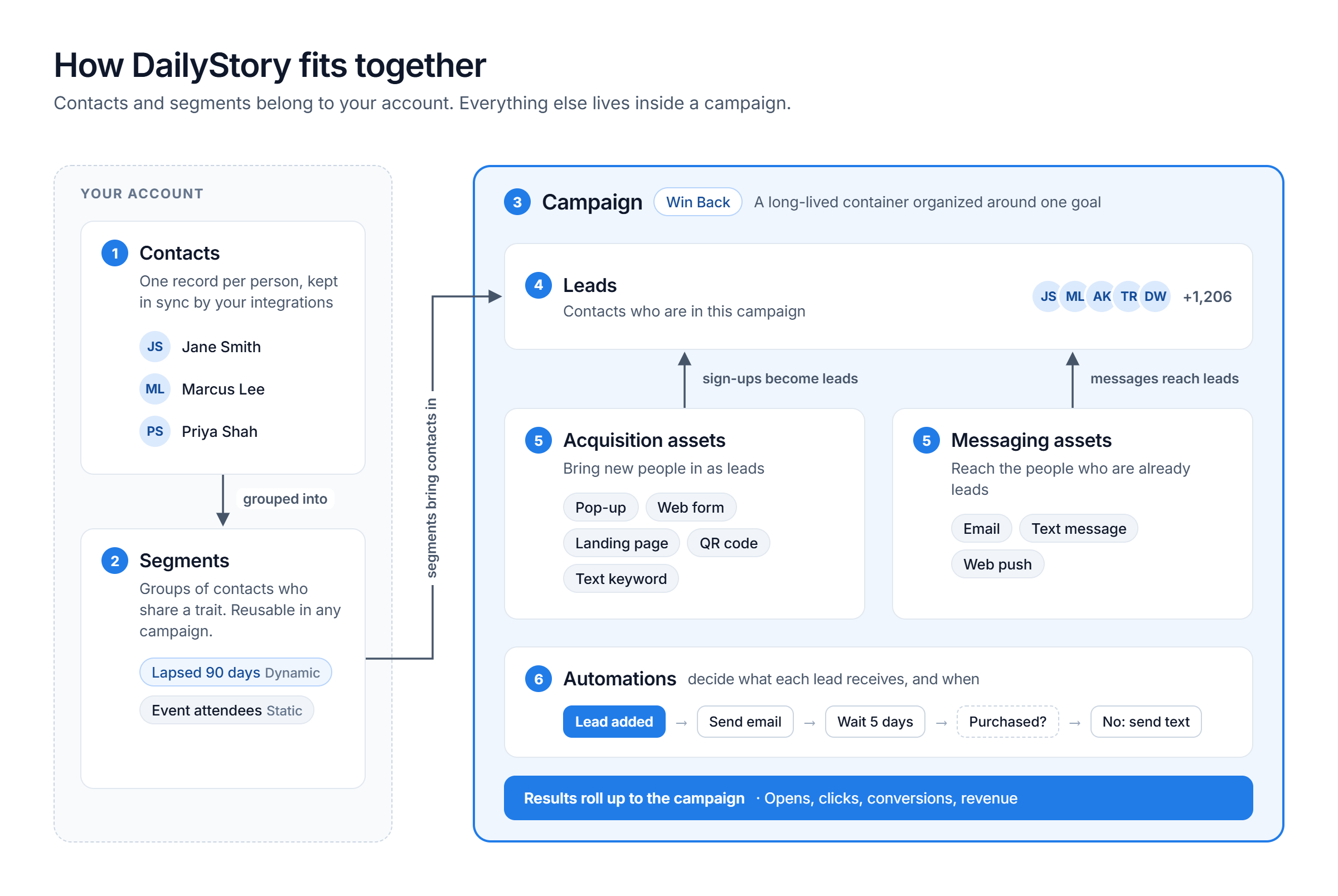
A contact is a single person in your DailyStory account. Each person has one contact record that holds their email address, mobile number, subscription status and the history of every interaction they have had with your marketing: emails opened, links clicked, forms submitted, purchases and more.
Contacts are enriched with custom contact fields, many of which are added and kept in sync automatically by DailyStory's integrations with your CRM, point-of-sale, e-commerce or membership system. Tags provide a lightweight way to label contacts, for example Customer, Prospect or Sent Q3 Survey.
One record per personDailyStory keeps a single, unified contact database. You don't maintain separate lists or audiences for different purposes; you use segments to select the contacts you need.
A segment is a group of contacts who share one or more common characteristics. Segments tell a campaign which contacts to include, and when you schedule an email or text message you choose the segments it is sent to.
The two most common types of segment are:
DailyStory also creates a few specialized segments automatically, for example when you import contacts or use loyalty.
Segments belong to your account, not to any single campaign. The same segment can be used by as many campaigns as you need. When a contact appears in several segments added to the same campaign, DailyStory removes the duplicates so the contact is in the campaign only once.
A campaign is an organized set of activities working toward a goal, such as welcoming new members, promoting a seasonal sale, winning back lapsed customers or sending a monthly newsletter. Campaigns are the cornerstone of DailyStory: everything you create is associated with a campaign.
Think of a campaign as a folder or a house for your marketing. It holds:
Campaigns are long-lived. A Newsletter campaign holds every monthly newsletter you send, and a Welcome Series campaign keeps welcoming new contacts for as long as it is running. Most accounts need only a handful of campaigns. To get started quickly, use one of the pre-built campaign templates or see Creating a campaign.
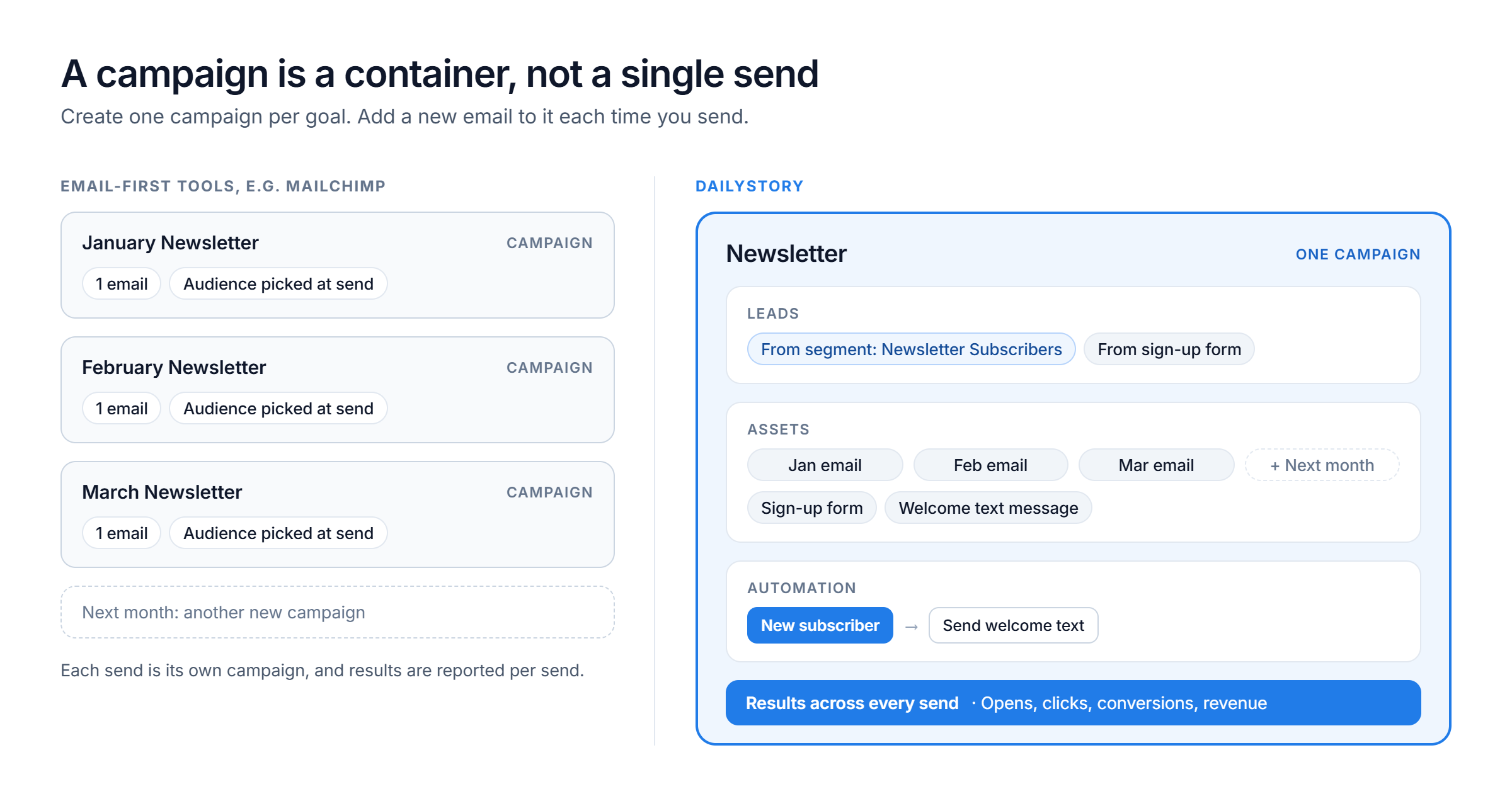
If you are coming from an email-first platform such as Mailchimp, the word campaign means something different. In those tools, a campaign is usually a single email send: you create a campaign, pick an audience, send it, and the campaign is finished. Next month's newsletter is a new campaign.
In DailyStory, that single send is an asset, and the campaign is the container that holds it, along with every related message, form and automation.
| Email-first platforms (e.g. Mailchimp) | DailyStory | |
|---|---|---|
| What a campaign is | A single email send | A goal-oriented container for many assets over time |
| Monthly newsletter | A new campaign every month | One Newsletter campaign containing an email for each month |
| Channels | Mostly email | Email, text messages, web push, pop-ups, forms, landing pages, QR codes and more, all in the same campaign |
| Who receives it | An audience or list chosen at send time | Leads brought into the campaign by segments, sign-ups or manual adds |
| Organizing contacts | Separate audiences or lists | One contact database with dynamic and static segments |
| Follow-up | Configured separately from the campaign | Automations live inside the campaign and act on its leads |
| Reporting | Per send | Per asset and rolled up across the whole campaign |
A common mistake for new customers is creating a new campaign for every email. Instead, create one campaign per goal and add a new email asset to it each time you send.
When a contact is part of a campaign, DailyStory calls that contact a lead in the campaign. A contact can be in no campaigns or in many, and has a separate lead record in each one.
For example, a customer who is in your Renewals campaign, downloaded a white paper and signed up for your newsletter is one contact with three leads, one in each campaign. Each lead tracks that person's activity, progress through automations and status within that campaign specifically.
Contacts become leads in a campaign in three ways (see Add contacts to a campaign):
An email or text message in a campaign can only be sent to that campaign's leads. Add segments or leads to the campaign before scheduling its assets.
An asset is anything you create in DailyStory to reach people or capture them. Every asset belongs to a campaign, and you add assets from the campaign's Assets tab.
| Asset | Purpose |
|---|---|
| Send a designed email to the campaign's leads, on a schedule or from an automation | |
| Text message | Send an SMS or MMS message to leads who have opted in to text messages |
| Text message keyword | Let people text a keyword to your number to opt in and join the campaign |
| Web push notification | Send a browser notification to people who allowed notifications on your website |
| Pop-up | Capture visitors on your website with a pop-up or banner |
| Web form | Collect sign-ups with a form hosted by DailyStory |
| Magic Form | Connect a form that already exists on your website to DailyStory, without rebuilding it |
| Landing page | Publish a standalone web page for an offer or event |
| QR code | Bring people from print or in-store signage into the campaign |
| URL shortener | Create trackable short links for ads, social posts and other channels |
| Automation | Decide what each lead receives and when, based on triggers and conditions |
Assets fall into two broad groups:
Because every asset belongs to a campaign, the campaign determines how the asset behaves:
If a campaign is deleted, its assets are moved to a special Unassigned campaign so they are not lost. Use global search to find any asset by name, whichever campaign it is in.
An automation is a workflow that runs leads through a sequence of steps without manual work. Automations are built visually in the automation designer from three kinds of blocks:
Every automation belongs to a campaign and always starts with a trigger. Most automations run once per lead, such as a welcome series. Evergreen automations can run the same lead through many times, which suits appointment reminders, form auto-replies and similar ongoing processes.
Here is how the concepts combine in a typical win-back program:
Once this campaign is running, it works on its own: new lapsed customers enter it automatically, and next quarter's offer is simply another asset in the same campaign.